All non-Thai nationals entering Thailand are now required to use the Thailand Digital Arrival Card (TDAC), which has completely replaced the traditional paper TM6 immigration form.
Last Updated: August 24th, 2026 8:13 AM
View the detailed original TDAC form guideIntroduction to the Thailand Digital Arrival Card by Agents
The Thailand Digital Arrival Card (TDAC) is an online form that has replaced the paper-based TM6 arrival card. It provides convenience for all foreigners entering Thailand by air, land, or sea. The TDAC is used to submit entry information and health declaration details before arriving in the country, as authorized by the Ministry of Public Health of Thailand.
The TDAC streamlines entry procedures and enhances the overall travel experience for visitors to Thailand.
Travelers seeing the new THIM app can read our guide to see how it relates to TDAC, why TDAC still matters before arrival, and why the THIM app is not a replacement for TDAC. It is currently better understood as an alternative submission method alongside TDAC, not a full replacement for the arrival card requirement.
The Thailand Digital Arrival Card (TDAC) is an online form that has replaced the paper-based TM6 arrival card. It provides convenience for all foreigners entering Thailand by air, land, or sea. The TDAC is used to submit entry information and health declaration details before arriving in the country, as authorized by the Ministry of Public Health of Thailand.
The TDAC streamlines entry procedures and enhances the overall travel experience for visitors to Thailand.
Travelers seeing the new THIM app can read our guide to see how it relates to TDAC, why TDAC still matters before arrival, and why the THIM app is not a replacement for TDAC. It is currently better understood as an alternative submission method alongside TDAC, not a full replacement for the arrival card requirement.
Video demonstration of the Agents TDAC system, and not the official TDAC immigration system. Shows the complete TDAC application process.
| Feature | Service |
|---|---|
| Arrival <72h | Free |
| Arrival >72h | $8 (270 THB) |
| Languages | 76 |
| Approval Time | 0–5 min |
| Email Support | Available |
| Live Chat Support | Available |
| Trusted Service | |
| Reliable Uptime | |
| Form Resume Functionality | |
| Traveler Limit | Unlimited |
| TDAC Edits | Full Support |
| Resubmission Functionality | |
| Individual TDAC's | One for Each Traveler |
| eSIM Provider | |
| Insurance Policy | |
| VIP Airport Services | |
| Hotel Drop Off |
Table of Contents
- Introduction
- Who Must Submit a TDAC
- When to Submit Your TDAC
- How Does the TDAC System Work?
- Why use the Agents TDAC System
- Multiple Entries into Thailand
- TDAC Full Edit Demo
- TDAC Form Field Help and Hints
- How to Login to Your TDAC Account
- Resuming Your TDAC Draft
- Copying a Previous TDAC Application
- Benefits of the TDAC System
- Updating Your TDAC Information
- Official Thailand TDAC Related Links
- TDAC Field Overview Guide
- Countries Declared as Yellow Fever Infected Areas
- Facebook Visa Groups
- View All 1,441 TDAC Related Comments
Who Must Submit a TDAC
All foreigners entering Thailand are required to submit the Thailand Digital Arrival Card before their arrival, with the following exceptions:
- Foreigners transiting or transferring in Thailand without going through immigration control
- Foreigners entering Thailand using a Border Pass
When to Submit Your TDAC
Foreigners should submit their arrival card information within 3 days before arriving in Thailand, including the date of arrival. This allows sufficient time for processing and verification of the information provided.
While it is advisable to submit within this 3-day window, you may submit earlier. Early submissions remain in a pending state and the TDAC will be issued automatically once you are within 72 hours of your arrival date.
How Does the TDAC System Work?
The TDAC system streamlines the entry process by digitizing information collection previously done on paper. The system offers two submission options:
- Individual submission (single traveler)
- Group submission (after completing the first page, you can add more travelers to the same submission; up to 100 travelers).
You can submit for free within 3 days before your arrival date, or submit earlier anytime for a small fee (USD $8). Early submissions are automatically processed when it becomes 3 days before arrival, and your TDAC will be emailed to you upon processing.
TDAC delivery: TDACs are delivered within 3 minutes of the soonest availability window for your arrival date. They are emailed to the traveler's provided email address and are always available for download from the status page.
Why use the Agents TDAC System
Our TDAC service is built for a reliable, streamlined experience with helpful features:
- Multiple languages
- Form resumability (save and continue later)
- Unlimited travelers in one submission
- Automatic submission attempts until successful
- Reliable document delivery by email
- Always-available download from the status page
Multiple Entries into Thailand
For regular travelers with multiple trips to Thailand, the system lets you copy a previous TDAC's details to quickly start a new application. From the status page, select a completed TDAC and choose Copy details to prefill your information, then update your travel dates and any changes before submitting.
Thailand Digital Arrival Card (TDAC) — Field Overview Guide
Use this compact guide to understand every required field in the Thailand Digital Arrival Card (TDAC). Provide accurate information exactly as it appears on your official documents. Fields and options may vary depending on your passport country, travel mode, and selected visa type.
- Use English (A–Z) and digits (0–9). Avoid special symbols unless shown on your passport name.
- Dates must be valid and in chronological order (arrival before departure).
- Your selection of Travel Mode and Transport Mode controls which airport/border and number fields are required.
- If an option says "OTHERS (PLEASE SPECIFY)", describe briefly in English.
- Submission timing: Free within 3 days before arrival; submit earlier anytime for a small fee (USD $8). Early submissions are auto processed when the 3 day window begins and the TDAC is emailed to you upon processing.
Passport Details
- First NameEnter your given name exactly as printed on the passport. Do not include family/surname here.
- Middle NameIf shown on your passport, include your middle/additional given names. Leave blank if none.
- Family Name (Surname)Enter your last/family name exactly as on the passport. If you have a single name only, enter “-”.
- Passport NumberUse uppercase letters A–Z and digits 0–9 only (no spaces or symbols). Up to 10 characters.
- Passport CountrySelect the nationality/country that issued your passport. This affects visa eligibility and fees.
Personal Information
- GenderSelect the gender matching your passport for identity verification.
- Date of BirthEnter your birth date exactly as on your passport. Cannot be in the future.
- Country of ResidenceChoose where you live most of the time. Some countries require city/state selection as well.
- City/State of ResidenceIf available, select your city/state. If missing, choose “OTHERS (PLEASE SPECIFY)” and type the name in English.
- OccupationProvide a general job title in English (e.g., SOFTWARE ENGINEER, TEACHER, STUDENT, RETIRED). Text may be uppercased.
Contact Details
- EmailProvide an email you check regularly for confirmations and updates. Avoid typos (e.g., name@example.com).
- Phone Country CodeSelect the international dialing code matching the phone number you provide (e.g., +1, +66).
- Phone NumberEnter digits only where possible. If including a country code, omit the leading 0 of the local number.
Travel Plan — Arrival
- Travel ModeSelect how you will enter Thailand (e.g., AIR or LAND). This controls the required details below.If AIR is selected, Arrival Airport and (for Commercial Flight) Flight Number are required.
- Transport ModeChoose the specific transport type for your selected Travel Mode (e.g., COMMERCIAL FLIGHT).
- Arrival AirportIf arriving by AIR, select the airport of your final flight into Thailand (e.g., BKK, DMK, HKT, CNX).
- Country of BoardingSelect the country of the last leg that lands in Thailand. For land/sea, select the country you will cross from.
- Flight/Vehicle Number (into Thailand)Required for COMMERCIAL FLIGHT. Use CAPITAL letters and digits only (no spaces or hyphens), up to 7 characters.
- Arrival DateUse your scheduled arrival date or border crossing date. Must not be before today (Thailand time).
Travel Plan — Departure
- Departure Travel ModeSelect how you will leave Thailand (e.g., AIR, LAND). This controls required departure details.
- Departure Transport ModeChoose the specific departure transport type (e.g., COMMERCIAL FLIGHT). “OTHERS (PLEASE SPECIFY)” may not require a number.
- Departure AirportIf departing by AIR, select the airport in Thailand where you will depart.
- Flight/Vehicle Number (out of Thailand)For flights, use airline code + number (e.g., TG456). Digits and CAPITAL letters only, up to 7 characters.
- Departure DateYour planned exit date. Must be on or after your arrival date.
Visa and Purpose
- Arrival Visa TypeChoose Exempt Entry, Visa on Arrival (VOA), or a visa you already obtained (e.g., TR, ED, NON-B, NON-O). Eligibility depends on passport country.If TR is selected, you may be required to provide your visa number.
- Visa NumberIf you already hold a Thai visa (e.g., TR), enter the visa number using letters and digits only.
- Purpose of TravelSelect the main reason for your visit (e.g., TOURISM, BUSINESS, EDUCATION, VISIT FAMILY). Choose “OTHERS (PLEASE SPECIFY)” if not listed.
Accommodation in Thailand
- Accommodation TypeWhere you will stay (e.g., HOTEL, FRIEND/FAMILY HOME, APARTMENT). “OTHERS (PLEASE SPECIFY)” requires a short English description.
- AddressFull address of your stay. For hotels, include the hotel name on the first line and street address on the next line. English letters and numbers only. Only your initial address in Thailand is required—do not list your full itinerary.
- Province/District/Sub-district/Postal CodeUse the Address Search to auto-fill these fields. Ensure they match your actual stay location. Postal codes may default to the district code.
Health Declaration
- Countries Visited (Last 14 Days)Select every country or territory where you stayed in the 14 days before arriving. Boarding country is included automatically.If any selected country is on the Yellow Fever list, you must provide your vaccine status and proof of Yellow Fever vaccination documents. Otherwise, only the country declaration is required. See the list of Yellow Fever–affected countries
Full TDAC Form Overview
Preview the full TDAC form layout so you know what to expect before you start.
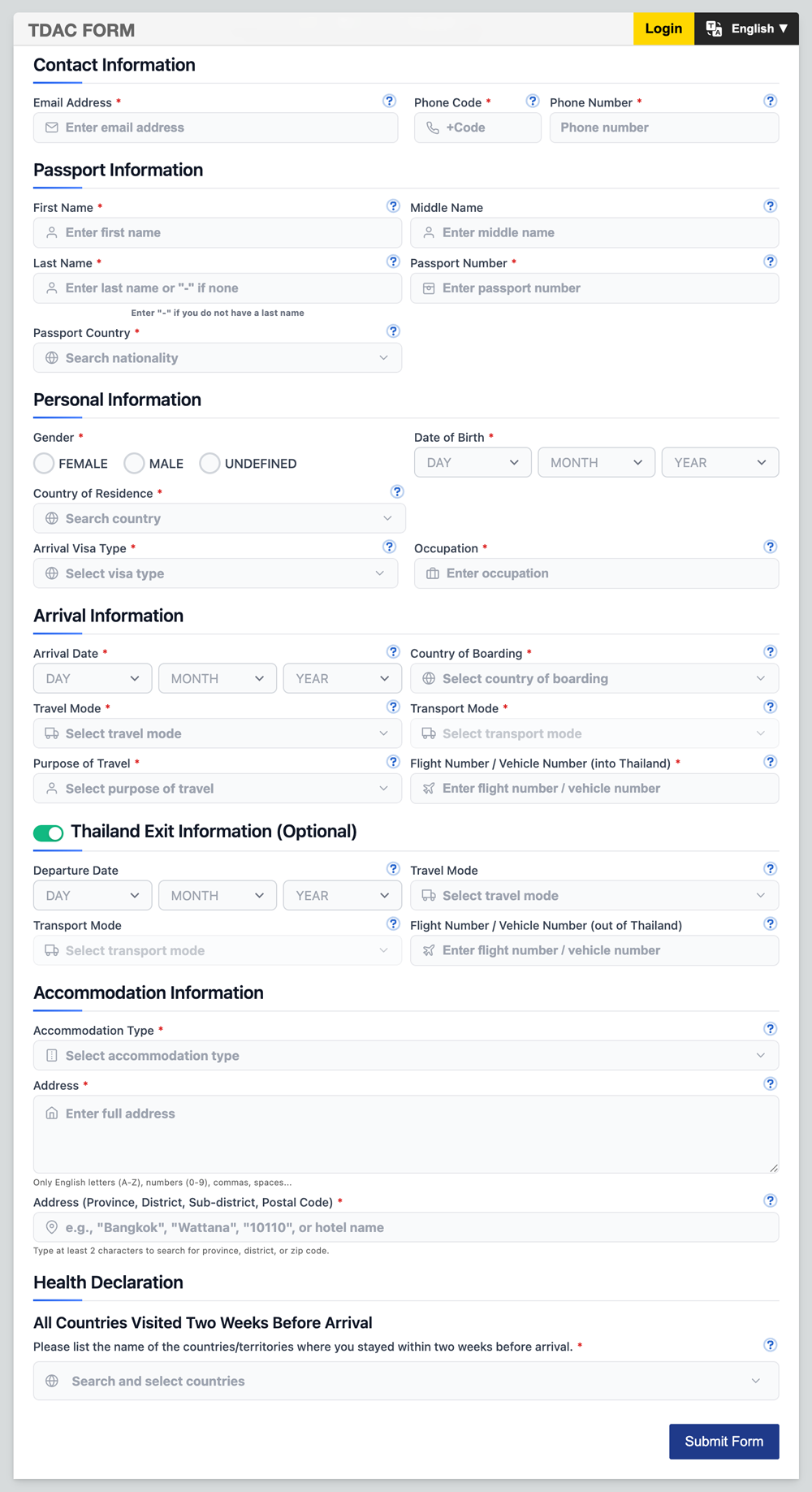
This is an image of the Agents TDAC system, and not the official TDAC immigration system. If you do not submit through the Agents TDAC system you will not see a form like this.
Benefits of the TDAC System
The TDAC system offers several advantages over the traditional paper-based TM6 form:
- Faster immigration processing upon arrival
- Reduced paperwork and administrative burden
- Ability to update information before travel
- Enhanced data accuracy and security
- Improved tracking capabilities for public health purposes
- More sustainable and environmentally friendly approach
- Integration with other systems for a smoother travel experience
Updating Your TDAC Information
The TDAC system allows you to update most of your submitted information anytime before your travel. However, certain key personal identifiers cannot be changed. If you need to modify these critical details, you may need to submit a new TDAC application.
To update your information, simply log in with your email. You will see a red EDIT button which allows you to submit TDAC edits.
Edits are only allowed if it is more than 1 day before your arrival date. Same-day edits are not permitted.
TDAC full edit demo
If an edit is made within 72 hours of your arrival, a new TDAC will be issued. If the edit is made more than 72 hours before arrival, your pending application will be updated and automatically submitted once you are within the 72-hour window.
Video demonstration of the Agents TDAC system, and not the official TDAC immigration system. Shows how to edit and update your TDAC application.
TDAC Form Field Help and Hints
Most fields in the TDAC form include an information icon (i) that you can click to get additional details and guidance. This feature is particularly helpful if you are confused about what information to enter in a specific TDAC field. Simply look for the (i) icon next to field labels and click it for more context.
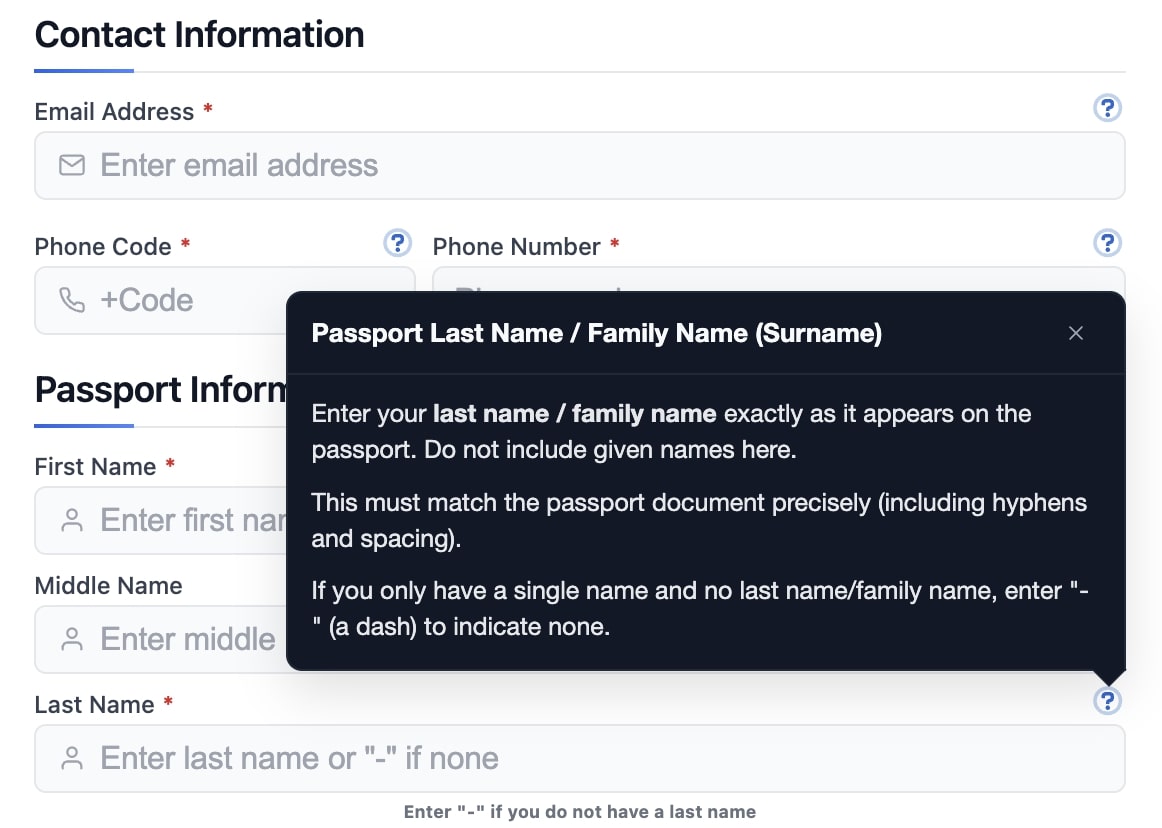
Screenshot of the Agents TDAC system, and not the official TDAC immigration system. Shows information icons (i) available in form fields for additional guidance.
How to Login to Your TDAC Account
To access your TDAC account, click the Login button located in the top right corner of the page. You will be asked to enter the email address that you used to draft or submit your TDAC application. After entering your email, you will need to verify it through a one-time password (OTP) that will be sent to your email address.
Once your email is verified, you will be presented with several options: load an existing draft to continue working on it, copy details from a previous submission to create a new application, or view the status page of an already submitted TDAC to track its progress.
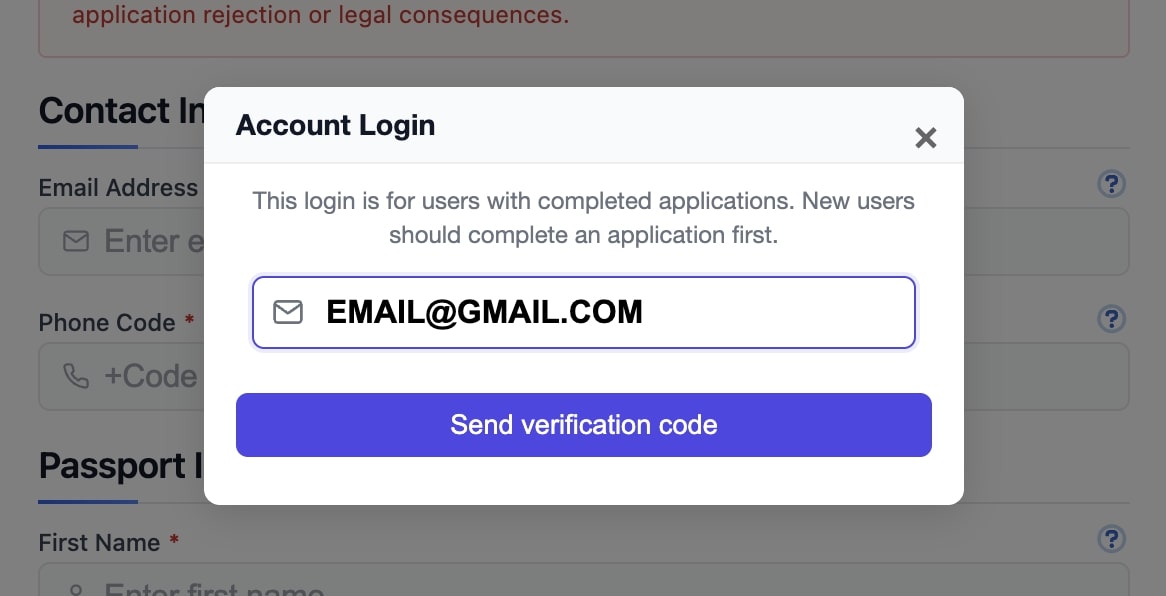
Screenshot of the Agents TDAC system, and not the official TDAC immigration system. Shows the login process with email verification and access options.
Resuming Your TDAC Draft
Once you verify your email and pass the login screen, you may see any draft applications associated with your verified email address. This feature allows you to load an unsubmitted draft TDAC that you can complete and submit later at your convenience.
Drafts are automatically saved while you are completing the form, ensuring that your progress is never lost. This autosave functionality makes it easy to switch to another device, take a break, or simply complete the TDAC application at your own pace without worrying about losing your information.
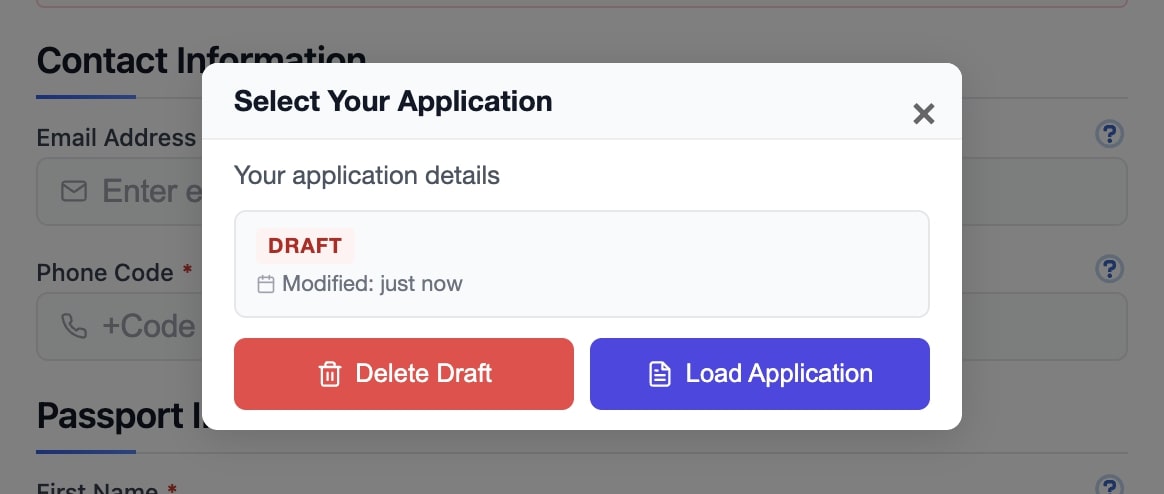
Screenshot of the Agents TDAC system, and not the official TDAC immigration system. Shows how to resume a saved draft with automatic progress preservation.
Copying a Previous TDAC Application
If you have already submitted a TDAC application in the past through the Agents system, you can take advantage of our convenient copy feature. After logging in with your verified email, you will be presented with the option to copy a previous application.
This copy function will automatically prefill the entire new TDAC form with the general details from your previous submission, allowing you to quickly create and submit a new application for your upcoming trip. You can then update any changed information such as travel dates, accommodation details, or other trip-specific information before submitting.
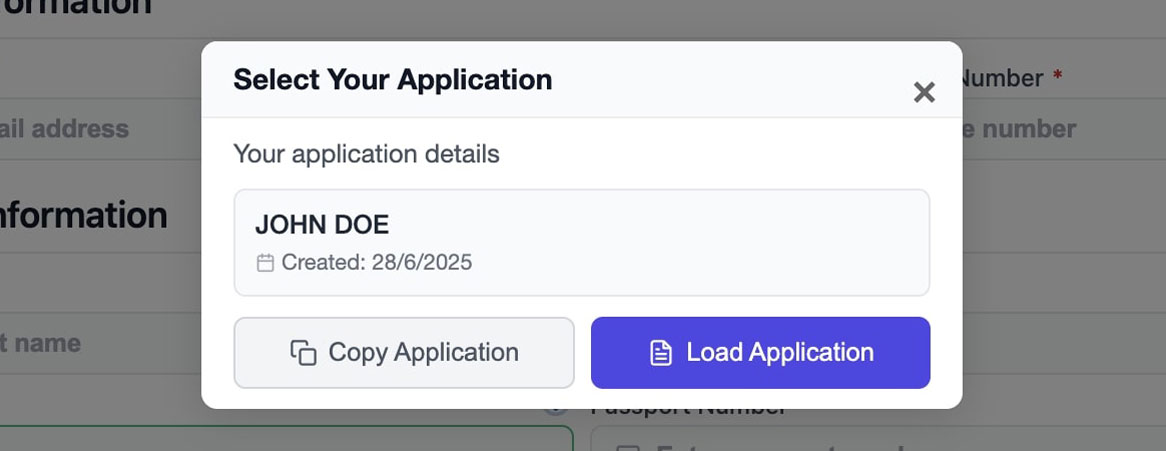
Screenshot of the Agents TDAC system, and not the official TDAC immigration system. Shows the copy feature for reusing previous application details.
Countries Declared as Yellow Fever Infected Areas
Travelers who have travelled from or through these countries may be required to present an International Health Certificate proving Yellow Fever vaccination. Keep your vaccination certificate ready if applicable.
Africa
Angola, Benin, Burkina Faso, Burundi, Cameroon, Central African Republic, Chad, Congo, Congo Republic, Cote d'Ivore, Equatorial Guinea, Ethiopia, Gabon, Gambia, Ghana, Guinea-Bissau, Guinea, Kenya, Liberia, Mali, Mauritania, Niger, Nigeria, Rwanda, Sao Tome & Principe, Senegal, Sierra Leone, Somalia, Sudan, Tanzania, Togo, Uganda
South America
Argentina, Bolivia, Brazil, Colombia, Ecuador, French-Guiana, Guyana, Paraguay, Peru, Suriname, Venezuela
Central America & Caribbean
Panama, Trinidad and Tobago
Official Thailand TDAC Related Links
For more information and to submit your Thailand Digital Arrival Card, please visit the following official link:
- Official TDAC Website - Thailand Immigration Bureau
- International Health Certificate Requirements - Ministry of Foreign Affairs
- 04/04/2025 - Thai Travel Thailand - TATKB
- 04/04/2025 - TDAC Country of Residence Update - TAT News
- 31/03/2025 - Thailand Immigration Bureau Facebook Post
- 05/03/2025 - Ministry Details on TDAC Implementation
- 24/02/2025 - MNRE Announcement on TDAC
- 03/02/2025 - Thailand to Start Online TM6 on 1 May 2025
- 03/02/2025 - Public Relations Department Announcement
- 03/02/2025 - Chiang Mai Airport Customs Announcement
- 31/01/2025 - Thailand Government Announcement
Facebook Visa Groups
Recent discussions
Ask Thailand CommunityThese topics are pulled server-side from the ASK community so travelers can quickly see the latest THIM- and TDAC-related discussion around the rollout.
Comments about Thailand Digital Arrival Card (TDAC)
Ask questions and get help with Thailand Digital Arrival Card (TDAC).
Comments (1,441)
Click comment and we will ask for your email, then OTP, then name.
Hi Team I'm having issue while booking the flight ticket It's showing your name character is exceeding 34 limit, My first name Benazir Beevi surname siraj Ahamed noornisa. What should I do could you please help?
Maybe try shortening your name on the booking to just your first and last name? Sometimes middle names cause issues with the character limit. Also, double-check the airline’s rules on name formats.
I bought 3 esim card and all aren't working showing no service
That’s frustrating, I had some issues with esim activation too. Did you try restarting your phone or maybe checking if your device supports the esim? Sometimes it just takes a bit of fiddling!
Yes, I did all steps including restarting mobile and no change, still no service
Hmm, sounds like a real headache. Have you tried contacting the esim provider? Sometimes the activation can get stuck on their end. Also, did you check if you’re in an area with good coverage?
No way , there is no service at all
That’s weird! When I arrived in Bangkok, using the THIM app and TDAC card worked fine for me, no service issues. Maybe there’s a network outage or something with the local carrier? Could be worth trying in a different spot or maybe the physical SIM option if esim keeps failing.
I bought again esim cards from true and i am the same location , that esim cards from tdac are wasted
That’s so frustrating, especially when you’ve tried multiple eSIMs! Sometimes True works better for me than TDAC, but if even True sims don’t get service there, maybe it’s really a local coverage issue. Have you checked with locals if that area is patchy?
I am flying to teach in BKK and do not have a leave date or flight, what should I enter in thr Departure section?
I had the same issue when I came. I just put a tentative date about a month from arrival, then updated the info in the THIM app once I knew for sure. It seemed to work fine for me.
It mostly depends on your visa type. If you're arriving on an exempt entry or tourist visa, you're definitely going to need a departure date from Thailand.
Yeah, that’s what I found too. For tourist visas, they really want a set date, but with the THIM app you can update it later if things change. Makes it a bit less stressful at least.
Greetings! When I attempt to complete the Thailand arrival card, it requests a "Family name." My passport does not list a family name; it only contains my names under the "given name"(Mohamad Abudhahir) section, with no surname. Surname field is blank in passport. What information should I provide in that field?
Hey, I ran into the same issue last trip. I just typed “XXX” in the family name field since my passport didn’t have one, and it worked fine with both TDAC and the THIM app. Might be worth a try!
Hi, when i try to apply Thailand arrival card it's asking me a Family name, I my passport I don't have a family name I have only first and my last name in given name no surname what should I enter there? Greetings! When I attempt to complete the Thailand arrival card, it requests a "Family name." My passport does not list a family name; it only contains my first and last names under the "given name" section, with no surname. What information should I provide in that field?
I ran into the same issue and just copied whatever you have as your last name into the family name field. It worked fine for me when entering the TDAC!
Did you enter your passport given name last name in the family name field? Can you please confirm?
Yes, that’s what I did, just put the last name from my given names into the family name spot, and it went through without any problems.
I have order nr.1175ebe1-b7b2-427b-92e4-506eacc90111 When it will be released? looking to hear from you as soon as possible Best regards
Hey, I’m not sure about exact release dates, but from what I’ve seen it usually takes a couple of weeks. Have you tried reaching out directly to the TDAC support or through the THIM app? Sometimes they respond faster that way.
If you applied early through our service, your TDAC will be automatically submitted and delivered at exactly 12:00 AM (Thailand time), as soon as you enter the 72-hour window before your arrival.
If you are already within the 72-hour window, your TDAC will be processed and delivered as soon as possible.
Yeah, that matches my experience too. The automatic submission at the 72-hour mark is super reliable, but if you’re cutting it close, submitting manually through THIM can save some stress.
How do I use the THIM? I tried to install it, and it said I cannot.
Did you check if your phone's region is set to Thailand? The app sometimes blocks installs if your phone isn’t set to that. Also, make sure your OS is up to date, THIM can be picky with older versions.
If you can't install it yet, don't worry; it's not required. You can apply for the TDAC from the website instead.
Yeah, that’s what I ended up doing since my phone wouldn’t let me install THIM. The web TDAC form worked fine and saved me a lot of hassle at the airport.
I am returning to Thailand from Lao ffor one day before I travel home to the US how do I update my digital arrival card?
You do not need to update your TDAC once it's already been used.
If you're re-entering Thailand, you need to submit another TDAC.
Yeah, that’s what I found too. Had to fill out a new TDAC for my quick return trip, it’s pretty straightforward each time. Just a bit annoying if you’re hopping in and out quickly.
What is this new THIM thing? Can i still use the TDAC?
Yes, you can still use the TDAC. You can read more about the THIM here: https://thim.in.th
В имени допущена ошибка вместо Татьяна, написано ТТАТЬЯНА
If you used AGENTS you can login and edit your TDAC, otherwise resubmit.
Untuk mode transportasi, saya pilih apa penerbangan "penerbangan komersial, penerbangan swasta/kargo, lainnya" dari Indonesia ke Thailand?
What should I fill in for the question; Country/Region where you boarded the plane, if I start in INDONESIA (CGK) and transit in MALAYSIA (KUL) but do not go through immigration, where the flight takes us to the final destination Thailand (HKT)? for different flight numbers between CGK-KUL and KUL-HKT
For your TDAC its whatever it says on the arrival ticket. So if the flight number that arrives in HKT is KUL-HKT you put that one.
Thank you
No problem
-Soy Ciudadano Boliviano , me encuentro en China, como inicio mi tramite de visa para ingreso a Tailandia para turismo una semana de estadia ?
The TDAC is not a visa, you can just apply for the TDAC at https://agents.co.th/tdac-apply/
I am coming to bangkok from morocco with correspondance in Istambul. Wich Departure Country. Country/Territory where you Boarded and flight number shoul I mention in the TDAC
For the TDAC you use the final flight country you are arriving from. Not the first country to depart from.
I just filled up the TDAC online but arriving in Thailand is only for my connecting flight.I did not know early that it does not require TDAC if it's only for connecting flight.What will I do?
If you pass immigration then you need a TDAC. If not then it's ok, the TDAC will be automatically cancelled if you do not enter with it.
Hello, my expats' family arrived in Thailand, he applied TDAC for his family, but he used own name instead of his child (So now there're 2 Mr. X with different passport number on the TDAC) They're already arrived in Thailand, is there a way to fix the information?
If they already arrived in Thailand it does not matter. There is no way to edit a TDAC which was already used to enter.
Hi, I am coming in Thailand with my family, 4 adults. Can we complete group form? Our flight is forom Cluj-Istambul-Bangkok-Phuket What do we write on the form? We land in 04.04.2026 when we should complete the form?
Yes you can use the agents form of group sizes up to 100: https://agents.co.th/tdac-apply
Hi, I am arriving on Sunday, 29 in the afternoon and will travel on Monday morning to Bhutan. So it's only transit. The website does not accept arrival on 29/3/2026 and departure on 30/3/2026. I have entered departure for 29/3 to achieve acceptance of my data. Is this ok?
Sometimes the form has errors, you should try the agents TDAC form if you have edge cases like this: https://agents.co.th/tdac-apply/ This should auto select "I am a transit passenger, I don't stay in Thailand." It's free as well.
I am arriving in Thailand on Sunday and I am filling in my TDAC… I was in Athens, Greece last weekend but when I am on the health section it does not allow me to select Greece from the drop down menu. What should I do?
For official TDAC Greece its "HELLENIC REPUBLIC (GRC)", you can do this through the agents form and it is much easier to find: <a href="https://agents.co.th/tdac-apply/" rel="nofollow noopener">https://agents.co.th/tdac-apply/</a>
We are not a government website or resource. We strive to provide accurate information and offer assistance to travelers.